A YouTube channel about coding and the tech topics I'm most passionate about.
When my dad brought home my first ever computer when I was around 8 years old, an old 486 running Windows 95, I immediately fell in love. There was so much you could do on this strange machine, like write documents in Microsoft Word, paint whatever went through my mind in Paint. Solitaire was the best game ever (because my dad didn't know how to install other games). It even had a builtin cup holder (I had no idea what a CD or a CD-ROM was). But after some attempts to clean up the Windows directory, which for some reason was full of these empty folders which in my mind were taking up a lot of space, it stopped working.
Since then, I've learned a lot about how these computers work, what makes them tick, and how to program them. My goal is to share this knowledge in the best way that I can, and maybe code some interesting stuff.
You can find all my videos on my channel, and all the code is on GitHub. We also have a community on Discord. I do my best to maintain a monthly schedule for videos which take a lot of time to make, and bi-weekly livestreams.
A text editor for musicians that detects the chords in your lyrics and plays them back.
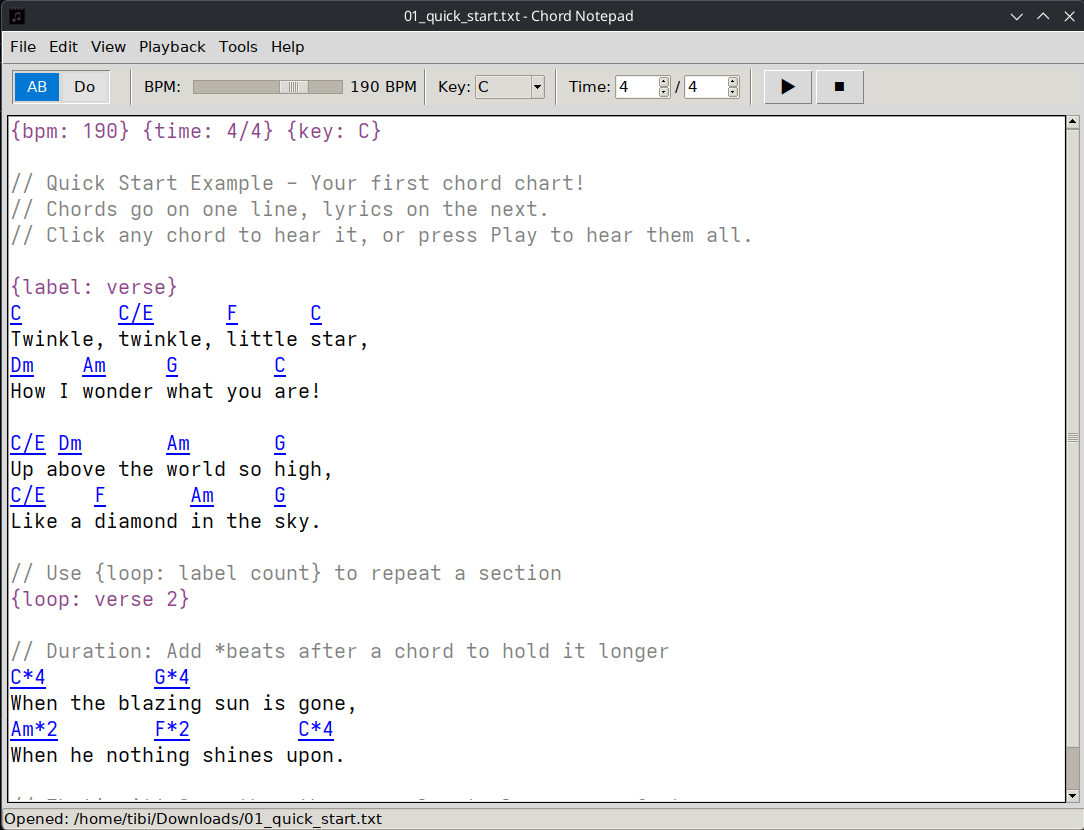
Chord Notepad is a text editor built for musicians. You type out your lyrics with chord symbols above them, the way you'd sketch a song on a scrap of paper, and it detects the chords automatically and highlights them as you write.
The useful part is that you can hear it. Click any chord to play it, or hit play and let the whole song run through at a tempo you choose. It understands everything from plain major and minor chords to the messier jazz voicings: 7ths, sus, diminished, augmented, add chords, half-diminished. The audio comes from FluidSynth, so playback sounds like a real instrument rather than beeps.
Download
Chord Notepad is free software, licensed under the AGPLv3.
Or from a terminal: sudo snap install chord-notepad. GitHub also has standalone x64 and ARM64 builds and Flatpak bundles.
Android
Coming to Google Play
The Android app is in testing. If you'd like to try it early, email me the Google account you use on your phone and I'll add you.
Hear it
C, G, Am and F, played by Chord Notepad on piano, guitar and ukulele.
Piano
Guitar
Ukulele
What it does
Write the way you already do. Chords on the line above the lyrics, in American (C, Am, Bb7), European (Do, Re, Mi) or Roman numeral (I, IV, V7) notation, from plain triads to slash chords and altered jazz chords.
Play it back. Click a chord to hear it, or play the whole song while each chord lights up. Set the tempo and time signature, pick from 128 instruments, and turn on the metronome.
Voicings a player would use. Piano chords that move smoothly from one to the next, playable guitar and ukulele fingerings in several tunings, and choir or string-quartet arrangements. You can edit any voicing or make your own.
Transpose and convert. Change the key of a song or a selection, switch between notations, get a capo suggestion, or work out a chord's name from its notes.
See the chords. A chord sheet shows the voiced chords as guitar chord boxes, tab, a piano roll or a staff.
Your files stay yours. Songs are plain text files, and you can export them to MIDI. No account, no ads, nothing sent anywhere.
How it was built
It started as a weekend project and took six months. The write-up covers how the chords get parsed, how the piano and guitar voicings are chosen, and how playback stays in time: Chord Notepad: I'll just build it myself.
A self-hosted tool to manage your YouTube subscriptions and download videos automatically.
After growing tired of YouTube's terrible UI, I wanted a better way of managing my subscriptions, and tracking the videos I watched. Initially, I thought of building a script that would automatically download videos from YouTube playlists and channels, and I would use the functionality of Plex to keep track of where I'm at. Soon, I realized that the amount of videos I want is far greater than the amount of space I have on my computer.
Finally, I settled on a web server, which in addition to downloading my videos, would also give me the ability to control my subscriptions more easily. I also decided to use Python and Django because I heard a lot of good things about it, and I wanted a seamless integration with youtube-dl.
A suite of various mathematical applications, including a matrix calculator, graphing calculator, and an integer factorization tool.
I built this a long time ago, in high school, back when I knew far less about software development than I do today. The main goal was to find my way around a slightly bigger project while picking up C#, Windows Forms and WPF, and to end up with something genuinely useful along the way. The result is this suite of small tools, a few of which came in handy at school, like the matrix calculator and the number factorization utility.
I am releasing it as free and open source, if anyone finds any parts of it useful, feel free to use it however you like.