Chord Notepad: I'll just build it myself
Building a text editor that reads the chords in your lyrics and plays them back, and the voicing, parsing and timing rabbit holes that came with it.
Recently, I’ve been trying my hand at songwriting. I had the lyrics down and a vague sense of the chords, and I wanted to hear how a few different progressions sounded without stopping to pick up a guitar every thirty seconds. I remembered there used to be one of those “chord transposing” websites which had exactly this feature I was looking for: being able to type a chord, then clicking it to hear it back. Because I couldn’t find it anymore, I just decided to write it myself… “It would only take like a weekend or 2”.
6 months later, here we are: the first official public release of Chord Notepad.
What is it?
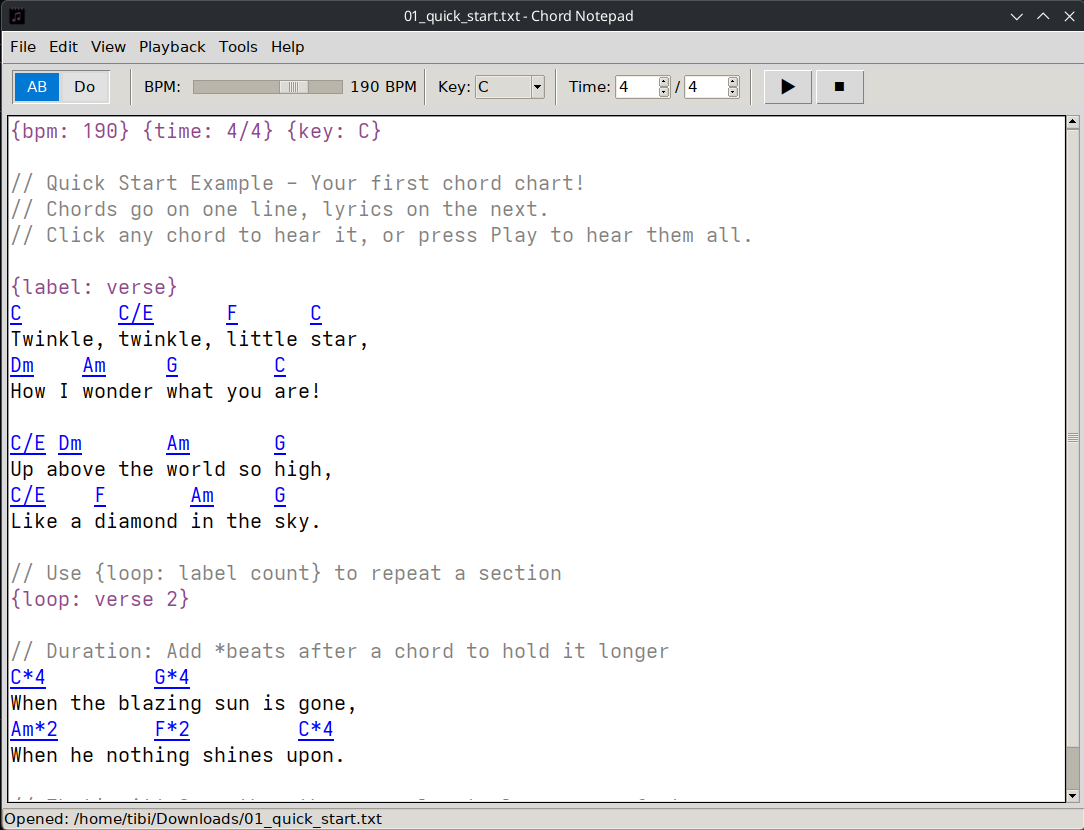
Chord Notepad is a text editor in which you write your lyrics with chord symbols on the line above them, the way you typically find chords written online:
C        C/E      F      C
Twinkle, twinkle, little star,
Dm    Am     G        C
How I wonder what you are!
As you type, it recognises the chords and turns them into links. Click any chord and you will hear it.
But wait, there’s more! you can press play and it runs through the whole song at a tempo and time signature of your choice, lighting up each chord as it goes.
There are a ton of features which make the application far more useful:
- You can set chord durations using
Am*2syntax (to play for 2 beats) - Directives allow you to change tempo
{bpm: 90}, time signature{time: 3/4}and key{key: F#}dynamically - Loops so you can repeat sections using
{label: chorus}and{loop: chorus}. - European/solfège notation support (using
Do Re Miinstead ofC D E) - Relative notation support which plays chords relative to the currently set key (e.g.
I viio vi V). - Customizable voicing system which can play chords realistically on fret-based instruments, piano and ensembles
- Visualizing the chords in one of several modes
Demo
User guide
For a full description of all the features, check the user guide PDF in the latest release.
How it works
The most important feature of the application is being able to hear chords. However, getting to that point means going through this pipeline:

For some of the steps, the rabbit hole goes surprisingly deep. Let’s explore it together.
Step 1: Finding the chords in the mess
Let’s start with this example:
    Am   F      G
But I Am Only A Singer
If we only used a simple regex parser like this: [A-GIiVv][#b]?, we would get the following matches: Am, F, G (the ones we expect) as well as I, Am, A. Natural language collides with chord notation, and things only get worse when we consider solfège notation and other languages. For example, La is an article, Si means “yes”, Mi is “my”. A Spanish or Italian lyric sheet would be a minefield.
How do we eliminate these incorrect matches? Something we can observe is that the chord line is pretty clean - it only has chords and spaces. The lyric line contains our incorrect matches, as well as other non-chord words. We can turn this into a heuristic: we count how many words in a line are valid chords, and based on that ratio, we classify lines into chord lines or lyric lines. Based on my testing, 60% as a threshold works quite well in most cases. We don’t want it to be too low, to avoid incorrect matches, and we also don’t want it at 100% - there can be chords that genuinely cannot be parsed, or short markers/notes added on a chord line (e.g. intro:, x2, soft).
In the example we started with, for the first line we have a 3/3 ratio (3 valid chords in 3 words) or 100%, and for the second line we have 3/6 or 50%, which falls below the 60% ratio.
Of course, there can be situations where this threshold fails, such as I Am A Great Singer - the ratio is 3/5 or 60% which crosses the threshold. While this area can definitely be improved, from my own testing I did not find it necessary.
Handling comments and directives
Comments and directives are stripped from the line before the ratio is counted. This eliminates the problem of comments counting towards lyric lines, or the C inside {key: C} being parsed. Similarly, duration suffixes are removed before matching, so C*2 is tested as C, and an NC rest counts as a chord, because C NC G NC is plainly a chord line. Punctuation is simply ignored.
Step 2: The parsing
When I started this project, I assumed reading a chord symbol was a solved problem: grab a music library, hand it the text, get the notes back. This proved to be a lot more difficult than it seemed.
The trouble is that there is no single way to write a chord. C minor can appear as Cm, Cmin, Cmi, C-, or just c. A major seventh is Cmaj7, CM7, or CΔ. Flats are b or ♭, sharps # or ♯, diminished dim or ° or o if you don’t like unicode, half-diminished m7b5 or ø. Some people write the notes as Do, Re, Mi. And then there’s the whole jazz zoo: C7b9, C13#11, Cmaj7#5(9), chords with more alterations than they have notes.
Since the parsing libraries I used (pychord and music21) don’t support all these formats, every symbol goes through a normalization process to knock all of that into one canonical spelling.
The normalisation gauntlet
Every chord runs through an ordered series of rewrites, and the order matters, because specific patterns have to run before general ones or they trip over each other:
- European note names to American:
DobecomesC - Unicode symbols to ASCII:
♭tob,♯to#,Δtomaj - Enharmonic collapse:
CbtoB,E#toF - Alternate qualities:
-/min/mitom,M7tomaj7,dom/dom7to7 - Lowercase means minor:
cbecomesCm - Symbols to words:
°todim,øtom7b5,+toaug - Then the fiddly one, parentheses:
C7(9)folds down toC9, butC7(b9)becomesC7b9, and whether an extension merges in or is just added depends on whether the base chord already has a seventh.
Here’s an example why order matters: normalizing Cdom7, we have 2 relevant rules:
domto7dom7to7
Applying them in this order would result in the output C77 which is not a valid chord, so we have to start with the more specific rule dom7.
Only after all of that does it try to work out the notes, and it leans on two real libraries to do it: pychord first because it’s fast, then music21 as a fallback because it understands more exotic spellings. Between them they cover the huge majority of what anyone actually types.
However, there are still situations in which the libraries miss, for example some chords that the libraries handle fine until you spell the root as a flat: C#aug7 resolves, Dbaug7 comes back empty, even though they’re the same keys on the piano. A small table of exceptions quietly covers the flat-rooted spellings the libraries drop (more details below). There are also a small number of chords the libraries can parse, but voice badly. For example, the dominant eleventh C11 stacks up as C E G B♭ D F. The E is the major third and the F is the eleventh, and they sit a semitone apart, which clashes. Players usually drop the third to avoid this.
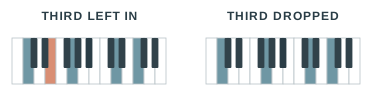
The solution? The QUALITY_INTERVALS table, which allows us to add exceptions and handle chords the libraries miss:
QUALITY_INTERVALS = {
    # voicings the libraries get wrong: drop the clashing tone
    "11":        [0, 7, 10, 14, 17],     # dominant 11th: drop the 3rd, it clashes under the 11th
    "13":        [0, 4, 7, 10, 14, 21],  # dominant 13th: drop the 11th
    # chords the libraries can't name at all
    "maj9#11":   [0, 4, 7, 11, 14, 18],
    "dim(maj9)": [0, 3, 6, 11, 14],
    # ...eighteen of these
}
For each chord, the parser will output 4 things: the list of note families, the bass note, root note, and the list of intervals. The bass note is the same as the root, unless we have a slash chord in which case it is extracted from the chord. Examples:
| Chord | notes |
bass_note |
root |
intervals |
|---|---|---|---|---|
Cmaj7 |
['C','E','G','B'] |
C |
C |
[0, 4, 7, 11] |
C11 |
['C','G','Bb','D','F'] |
C |
C |
[0, 7, 10, 14, 17] |
C/E |
['C','E','G'] |
E |
C |
[0, 4, 7] |
Am/G |
['A','C','E'] |
G |
A |
[0, 3, 7] |
C/F# |
['C','E','G'] |
F# |
C |
[0, 4, 7] |
Step 3: Making it sound human
The next stage of the pipeline is voicing the chords; from this list of note families and intervals, we need to get the actual MIDI notes that we send to the playback engine. This presents us with a very interesting problem: how do we choose which notes to play, and make them sound good?
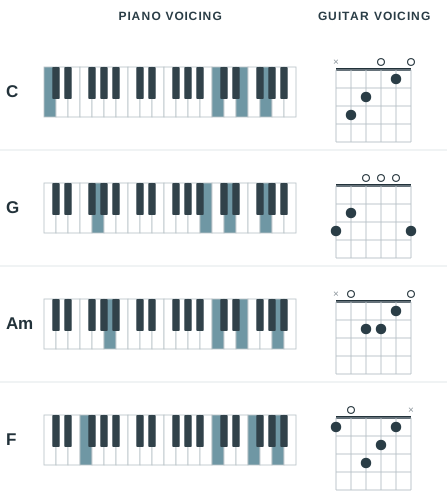
We need to think about how a real player interacts with the instrument, and follow the physical constraints of that instrument. A pianist puts a C in the left hand and spreads E, G and another C above it. A guitarist plays a particular shape with a doubled note or two and some open strings ringing.
In Chord Notepad, I decided to implement 3 different models for 3 classes of instruments: piano, fretboard (guitar, ukulele etc) and ensemble (strings, choir etc).
The shared engine
The voicing problem is, at the core, a search problem: out of the set of all possible voicings, we need to find an “ideal voicing”, based on a set of hard and soft rules that define each voicing model. What makes the process more complicated is that we cannot look at chords in isolation; the transition from one chord to the next also needs to be taken into account. Whatever the instrument, a player tends to stay put rather than jump around from one chord to the next; a guitarist keeps their hand in the same area of the neck, a pianist their hands in the same region of the keyboard. An ideal voicing will choose the smoothest path through the entire song.
To put it simply, these are 4 stages in the process:
- enumerate all candidate voicings
- filter out the ones impossible to play based on a set of hard rules
- score the remaining voicings using the soft rules
- search for the ideal path across the whole song to maximize the voicing + transition scores.
The most challenging step is the search. Picking the best voicing for each chord in isolation doesn’t work (a locally perfect choice can wreck the next transition), and brute-forcing every path is hopeless (30 voicings across 40 chords is a 60-digit number of combinations). Luckily, there is a better way. The best path ending on a given voicing of the last chord can be built out of the best paths ending on each voicing of the second-to-last chord, plus the step into that final voicing. So solving the whole song only needs the answers for the song one chord shorter, which need the answers for one shorter still, and so on down to the first chord, which has nothing before it to constrain it. This is the classic shape of a dynamic programming problem, and better still, there is an algorithm built for exactly this case: the Viterbi algorithm.
How Viterbi search works
To explain the algorithm, we will start with a simplified example. Here is a mini-song, five chords long:
C G F Am C
We will give each chord only two candidate voicings: an open-position shape, or a barre shape up around the fifth fret. We will use the following 2 soft rules:
- Quality is how good a shape sounds on its own, from 0 to 10. Open, ringing shapes score high; thin or cramped ones score low.
- Transition scores how smoothly one shape leads into the next. Staying in the same zone scores 0; jumping to the other zone scores -5, since the hand has to leap.
A path’s score is just the sum of the two: the five quality scores and the four transition scores.
Let’s consider the following qualities of every candidate:
| Chord | Open position | Barre |
|---|---|---|
| C | 7 | 3 |
| G | 7 | 3 |
| F | 3 | 7 |
| Am | 5 | 4 |
| C | 4 | 9 |
There is a tension baked in. C, G and Am sound better when open, but F is a muddy stretch down there and comes alive up the neck, and the final C wants a bright, high voicing worth 9. Any jump between the two zones scores -5.
A small note here: these scores are just made up for this example. In the real implementation, the score is calculated from a well-defined set of rules (see the next chapters for more details).
First, let’s try a naive approach: we’ll take the highest-quality shape for each chord on its own, and we get C and G open, F barre, Am back open, the final C barre again. The quality adds up to 35, but the hand lurches up and down the neck three times, and those three -5 transitions drag the total down to 20.
C[open] --> G[open] --> F[barre] --> Am[open] --> C[barre]
   7     0     7    -5     7     -5     5     -5      9
Let’s see how Viterbi would work. We will need 2 tables: the best score table, and the back-pointer table. Each column represents a chord in our sequence, and each row represents a candidate voicing for that chord. This would be the initial state of the tables:
| C | G | F | Am | C | |
|---|---|---|---|---|---|
| Best Score: | |||||
| - open | - | - | - | - | - |
| - barre | - | - | - | - | - |
| Back pointers: | |||||
| - open | - | - | - | - | - |
| - barre | - | - | - | - | - |
We will iterate through every chord in the sequence. At each step, we fill the corresponding columns:
best[i][c] = quality(i, c) + max over p of ( best[i-1][p] + transition(p, c) )
back[i][c] = p for which we found max
Chord C. Since this is our first position, we will only fill with quality(i, c), and the back pointers remain blank:
| C | G | F | Am | C | |
|---|---|---|---|---|---|
| Best Score: | |||||
| - open | 7 | - | - | - | - |
| - barre | 3 | - | - | - | - |
| Back pointers: | |||||
| - open | - | - | - | - | - |
| - barre | - | - | - | - | - |
Chord G. Starting with the open G position, its quality is 7. To reach it, we have two possibilities: move from open C, which gives 7 (score of open C) + 0 (transition) = 7, or from barre C, which gives 3 - 5 = -2. The best of these is 7, and adding open G’s own quality of 7 gives us 14, with the back pointer set to “o”.
We do the same for the barre G position: its quality is 3; moving from open C gives 7 - 5 = 2, from barre C gives 3 + 0 = 3, so the best arrival is 3. Adding barre G’s quality (3) gives 6, and the back pointer is “b”.
| C | G | F | Am | C | |
|---|---|---|---|---|---|
| Best Score: | |||||
| - open | 7 | 14 | - | - | - |
| - barre | 3 | 6 | - | - | - |
| Back pointers: | |||||
| - open | - | o | - | - | - |
| - barre | - | b | - | - | - |
Repeating the same steps over each chord in the sequence, our final tables look like this:
| C | G | F | Am | C | |
|---|---|---|---|---|---|
| Best Score: | |||||
| - open | 7 | 14 | 17 | 22 | 26 |
| - barre | 3 | 6 | 16 | 20 | 29 |
| Back pointers: | |||||
| - open | - | o | o | o | o |
| - barre | - | b | o | b | b |
From here, we pick the best score, 29 ending on a barre C, and follow the back pointer table, right to left, to reconstruct the full path. The back pointer table tells us which voicing of the previous chord we picked to arrive at the current chord.
final C barre -> Am barre -> F barre -> G open -> C open
And finally, we reverse into the playback order:
C open, G open, F barre, Am barre, C barre
Of course, a real song gives far more than two voicings per chord, and the number varies from chord to chord. Two cutbacks keep the runtime in check. First, before the search even starts, each chord throws away all but its 30 highest-quality voicings, so no column in the grid is ever taller than 30. Second, as the sweep runs left to right, it keeps only the 20 highest-scoring partial paths alive at each step instead of carrying every one forward, a shortcut known as beam search. Both are approximations, and we might drop a voicing that would have led somewhere slightly better, but they cap the work, keep the app responsive, and in practice the result is consistently good.
Another small thing, ties always break toward the lower-numbered candidate, which makes the result deterministic, and that determinism is the quiet reason a repeated section returns to the same voicing instead of drifting.
Piano
The piano model is all about voice leading, which means moving as little as possible from one chord to the next. Going from C to Am, it looks at where your hand just was and picks the shape of Am nearest to it, holding any shared notes exactly where they are instead of leaping across the keyboard. It shifts the whole thing up or down an octave to stay in a comfortable range, drops a root note into the bass, and scores each option by how far the notes had to travel.
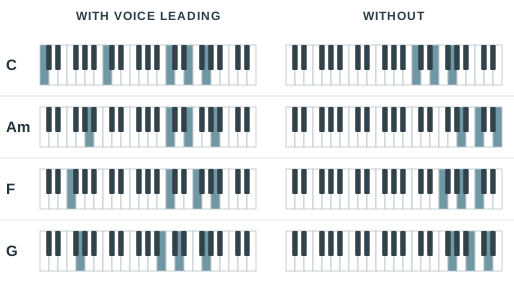
Generating the candidates. A piano voicing is two hands: a single bass note in the left, sometimes doubled an octave up, and a stack in the right. The right hand is built from scratch for every chord. Each inversion is tried in turn, so every tone gets a chance to be the lowest, that bottom note is anchored at a few octaves in a window around middle C, and the rest are stacked in closest position above it. When a chord has more notes than five fingers can hold, the generator sheds them in the order a pianist would, the fifth first and then the root, and it never touches the third, the seventh or a colour tone. A plain triad or seventh chord comes out to roughly a hundred candidate voicings, which the whole-song search later trims to its best thirty.
The hard rules. These are just the geometry of two hands, and a voicing that breaks any one of them is thrown out before it is ever scored:
- at most five notes per hand, one per finger;
- a reach no wider than a ninth (fourteen semitones) within a hand;
- every note inside the range the model can play, the left hand from C1 to C3 and the right from C3 to C6;
- the right hand strictly above the left, which keeps the hands from crossing or landing on the same key;
- and ten notes total at the very most.
They rarely all bite at once, but a dense jazz chord can exhaust them, and when nothing fits, a fallback clamps the raw notes into range so the chord still sounds something.
Scoring. Each surviving voicing earns a quality score for how it sounds on its own, and the whole-song search adds a transition score for the move into it.
Quality is dominated by completeness, and not every note in a chord matters equally. Leaving one out costs a different amount depending on its job: dropping the third or the seventh is punished hardest, 40 points each, because between them they decide whether the chord is major, minor, or a seventh at all. A colour tone, the fourth of a sus4 or an added sixth, costs 30, since it is the chord’s character rather than decoration. The fifth is close to filler at 8, an upper extension 7, and the root only 4, because the bass has almost always got the root covered anyway. The absolute numbers don’t matter; the gaps between them do. A voicing missing its third scores so far below one missing its fifth that the search will shed fifths all day before it drops a note that defines the chord.
The rest of the quality score keeps the piano sounding like a piano. A small reward per right-hand note (0.6) leans toward fuller voicings, while a stronger pull of 1.4 per semitone holds the right hand’s average pitch near a central register, and that pull is the single thing that stops a looping song from climbing into the top octave one repeat at a time. Muddy combinations are marked down: close intervals struck low, and gaps wider than an octave inside the right hand. The bass, meanwhile, is happiest in the second octave and loses a point and a half for every semitone it strays out of it.
Voice leading, the thing the model is supposedly “about”, is deliberately the cheap part of the score. Holding a note exactly in place is worth 1.5 and every semitone of movement costs 0.35, small enough that voice leading only ever chooses between voicings that are already complete and well placed. It smooths the join between two good chords; it will never talk the search into a muddy or gutted one to save a little motion.
What the scorer actually counts
Completeness runs off a table shared across the whole app (the choir uses the same one), where every chord tone is tagged by role and each role carries a cost for leaving it out:
DEFAULT_OMIT_PENALTY = {
    'root':      4.0,   # the bass has it covered
    'third':    40.0,   # major or minor: the chord's identity
    'fifth':     8.0,   # harmonically weak, first to be dropped
    'seventh':  40.0,   # what turns a triad into a seventh chord
    'color':    30.0,   # a sus4's fourth, an added 6th: the character
    'extension': 7.0,   # 9ths, 11ths, 13ths: expendable when tight
}
Everything else is smaller and about placement rather than content: +0.6 per right-hand note, -1.4 per semitone off the register centre, -2.0 for a close interval sounding muddily low, -1.5 per semitone the bass sits out of its octave, and for voice leading +1.5 per held common tone against -0.35 per semitone of movement.
Fretboard
On a fretboard the limit is not taste but physics: most sets of notes simply cannot be held by a hand at all. So instead of arranging pitches freely, this model hunts for a fingering, a specific fret (or a mute) on each string, that a real hand can fret and a strum can actually sound. Everything below is written about a guitar, but nothing in it is guitar-specific; the same model drives every fretted instrument.
Generating the candidates. There is no library of memorised chord shapes here, and nothing counts notes to guess whether a chord is major or minor. Every fingering is built from the fretboard up. For each string the options are simple: mute it, or press any fret whose pitch is one of the chord’s tones (or the slash bass). A depth-first search walks every combination of those per-string options, pruning as it goes any branch that has already stretched too far or can no longer reach enough of the chord’s notes, and checking, whenever a fingering needs more fingers than a hand has, whether a single barre could hold the extras. It is all cached per chord, since the set of reachable fingerings depends only on which pitches are involved.
Building every fingering from the fretboard up, instead of matching against a catalogue of shapes, has one payoff worth calling out: a memorised shape only spells the right chord in the tuning it was learned for, whereas working from pitch classes on the neck handles any tuning at all. Retune a string, or hand it a ukulele, and the picker just works, no new shapes required.
The other pleasant surprise is that the freedom costs nothing familiar: it keeps rediscovering the shapes a guitarist would reach for anyway. The open C, G and Am fall out of nothing but “which reachable fingerings spell this chord, and which one moves least from the last.” It is the stranger chords, and the long runs that drag the hand up the neck, where it lands on fingerings you would not find in a chord book.
The hard rules. A fingering has to be physically playable, so anything failing these is dropped:
- a stretch no wider than four frets, with a relaxation ladder that allows five if nothing tighter fits;
- no more fretted strings than there are fingers (four), unless one flat finger can barre the extras, with room for the remaining fingers above the bar and no open string trapped under it;
- every string that sounds is a chord tone, the one exception being a slash bass, which is allowed to ring but does not count toward covering the chord;
- and enough of the chord actually present to be recognisable, how much depending on how many notes it has.
When even the relaxed pass finds nothing, the picker falls back to a partial voicing, and failing that just plays the root on its own, on the principle that one right note beats silence. However, this happens quite rarely, and only on really odd tunings.
When nothing is playable
How much of the chord has to be present scales with its size:
three notes or fewer, play all of them; four or five, at most one missing; six or more, at least four present.
A dense seven-note jazz voicing simply cannot be held on six strings, so when the normal search comes up empty a ladder relaxes the limits a rung at a time: first the wider five-fret stretch, then, still empty, it drops the coverage floor and lets a triad degrade to two tones, then one. If even that finds nothing, a last-ditch fallback plays just the root on the lowest string or two. Something always sounds.
Scoring. With a pile of playable fingerings in hand, the score sorts the comfortable from the contorted. It rewards a fingering that rings out: +1.2 for every string that sounds and another +0.5 for each that rings open. Getting the bass right counts for a lot, +8 when the lowest note is the chord’s root and a full +12 when it is a called-for slash bass, because a wrong bass note is far more noticeable than a missing inner voice. Everything that makes a shape hard to play is a cost: the wider the fret span the worse (-1.2 a fret), the further up the neck the worse (-0.6 per average fret), each fretting finger -0.5, a barre -1.0, and a sharp -6.0 for the kind of three-fret shape that isn’t a clean lengthwise reach, the sort your fingers refuse to make. A dead string in the middle of a strum costs -4.0, since muting an interior string cleanly is its own small feat.
The move between chords is scored on how little the hand shifts: -1.0 for each fret the hand’s centre travels, and +0.4 for every finger that gets to stay planted on its string across the change. That is the “stay in one area of the neck” instinct turned into a number.
Ensemble
Piano and guitar both hand you a stack of notes and let one player sound them together. A choir doesn’t work like that. It’s four separate voices singing four separate lines, bound by a set of rules about how those lines may move. So the third model drops the idea of a chord as a block and treats it as four independent melodies, or three, or six, that happen to agree at each moment.
Generating the candidates. Enumeration hands each chord tone to a voice and picks an octave for it so that voice lands in its own range, the soprano up high, the bass down low. When there are more voices than the chord has tones, a tone gets doubled, the root by preference and the fifth readily, the third only reluctantly and the seventh almost never. When there are fewer voices than tones, one gets dropped instead, and the same completeness table that guides the piano decides which: the fifth and any extension go first, while the defining third, seventh and colour tones are held onto almost to the last. Every chord tone also gets a turn in the bass, since each is a different inversion. The voices are stacked from the bottom up, keeping a few hundred partial stacks alive at each step so the search stays quick, and the best thirty complete voicings per chord go forward to the whole-song search, the same as the other models.
The hard rules. These are the constraints a choir physically and conventionally obeys:
- every voice inside its own range;
- no voice crossing below the one beneath it (two voices may share a note, but they may not swap order);
- and no adjacent pair spread wider than the spec allows, typically about an octave between the upper voices and more between tenor and bass.
If a chord cannot be voiced inside those limits, a ladder loosens them a step at a time, widening the ranges, then dropping the spacing caps, and finally forcing a plain stacked chord, so a voicing always exists.
Scoring. Within a single chord the scorer rewards a sensible doubling (the root is worth +2 to double, the fifth a mild +0.5, while doubling the seventh is punished at -6) and reuses the same completeness table the piano does for anything left out. It prefers root position, charging as much as -5 for putting the fifth in the bass, and it keeps each voice off the extreme edges of its range.
The interesting rules are the ones between chords, the actual grammar of part-writing. A common tone held in the same voice earns +1.5, small steps are cheap and leaps are not (-2 past a fifth, another -6 past an octave), and the two sins every harmony teacher circles in red, parallel fifths and parallel octaves, cost a flat -25 apiece, far more than anything else in the model. That one dominant penalty is why the choir will take an awkward leap in an inner voice rather than let two parts slide in parallel: the search would sooner do almost anything than commit the cardinal sin. On top of that it nudges the outer voices to move in opposite directions (+0.8), and it honours the two resolutions tonal music trains your ear to expect, a chordal seventh falling by a step and a leading tone rising into the tonic, worth +1.5 each. The bass, as the freest voice, is charged less for moving than the inner parts. Doubling the leading tone, a classic beginner’s mistake, costs -8.
The rules of part-writing, as weights
Every one of those “rules” is a signed number the scorer adds to a candidate. A handful of them:
"common_tone_bonus":             1.5,   # a voice that keeps its note
"contrary_motion_bonus":         0.8,   # outer voices moving opposite ways
"seventh_resolution_bonus":      1.5,   # a chordal 7th falling by a step
"leading_tone_resolution_bonus": 1.5,   # the 7th of the scale rising to the tonic
"leap_penalty":                 -2.0,   # a voice jumping more than a fifth
"double_leading_tone_penalty":  -8.0,
"parallel_perfect_penalty":    -25.0,   # parallel 5ths / 8ves: the cardinal sin
The parallel-perfect penalty dwarfs everything else on the list, so the search will happily take an awkward leap in an inner voice if that’s the price of keeping two voices from sliding in parallel fifths. Nudge the numbers and you nudge the choir’s taste.
One engine, many instruments
By now the three models rhyme: enumerate, filter on the hard rules, score, then run the same whole-song search. The only things separating one instrument from another are numbers, which are treated as customizable parameters. Each instrument is a spec: a piano’s hand span and register, a fretboard’s tuning and fret reach, an ensemble’s voices and their ranges. Change the numbers and you have a different instrument. The Voicings page in the settings is just an editor over those specs.
What that buys is one model spanning instruments that feel nothing alike. The fretboard model plays standard guitar, drop D, DADGAD and open G off nothing but different tunings. The ukulele is the same model again, and a more interesting case: four strings, re-entrant, its top string tuned above its neighbour rather than below. The picker judges the bass on a string’s actual pitch rather than its position, so “the lowest string” keeps meaning the lowest note. It also carries its own weights: with every string inside a single octave, chasing a root down into the bass just drags shapes up the neck for nothing, so that reward is turned almost off and ringing all four strings is turned up. Those two numbers are the difference between guitar shapes and ukulele shapes.
Ensembles vary the same way. A mixed SATB choir, a male TTBB, an upper-voice SSA and a string quartet are all the ensemble model with different voice lists, the quartet simply allowing wider gaps than singers would reach for. A custom voicing is nothing more than another entry in the config, so a barbershop quartet is four voices and their ranges:
"voicings": {
  "barbershop": {
    "model": "ensemble",
    "voices": [
      {"name": "Tenor",    "range": ["C4", "A4"]},
      {"name": "Lead",     "range": ["A3", "F4"]},
      {"name": "Baritone", "range": ["F3", "D4"]},
      {"name": "Bass",     "range": ["E2", "C4"]}
    ]
  }
}
Pick it in the settings and the same code that voices a grand piano is writing four-part barbershop.
Having this voicing engine made capo detection almost trivial to add. A capo raises every open string by a fret or two, which is just the fretboard spec with a few semitones added. So finding the best capo comes down to this: raise the spec a fret at a time up to the seventh, voice the whole song on each retuned guitar, and keep whichever the picker’s own scorer rates easiest to play. A song full of barre chords in F# comes back with “try capo 2”.
Clicking one chord
All of this assumes a whole song. The Viterbi search only earns its keep because it can see the whole progression at once and weigh each voicing against its neighbours on both sides. But the feature I started with was clicking a single chord to hear it, and a lone click has no song around it, and no future to look ahead to.
So the click path keeps the parts and drops the search. It builds the same candidate voicings and scores them with the same quality and transition rules, then takes the plain best: highest quality, plus the transition from whatever chord you last clicked. The picker remembers that last voicing between clicks, so tapping down a progression by hand still leads smoothly, each chord landing near the one before. What it gives up is the lookahead. This is a greedy, one-chord-at-a-time choice, the same kind of local decision that lost to Viterbi in the deep-dive. But for a chord that has to sound the instant you click it, there is no future to consult, so greedy is not a shortcut here, it is the only honest answer.
Step 4: Playing it at the right time
Once we know what notes to play, the last step is to actually… play them. This part has been rebuilt a few times, because the limitations prevented me from implementing a feature I needed.
Version 1: the simple callback loop
In the original implementation, I had a thread running a playback loop which would get the next notes to play and duration from the voicing engine using a callback, then it would send those events to FluidSynth, wait for the given duration, then stop the notes:
def _playback_loop(self):
    while self.is_playing and not self.stop_event.is_set():
        self.pause_event.wait()               # blocks here while paused

        midi_notes, duration_beats = self.get_next_note_callback()
        for note in midi_notes:
            fluidsynth.noteon(self.channel, note, 100)

        time.sleep(self._beats_to_seconds(duration_beats))

        self.stop_all_notes()
While this worked for playing chords, it fell apart the moment I wanted a metronome. The loop sleeps through a whole chord at a time, so there was nowhere to fire a click on each beat: a chord held for four beats is one sleep, not four.
Another issue was related to clock drift. Any processing outside the “sleep” function introduced small amounts of delay, which would add up.
Version 2: producer - consumer
The second rewrite switched to a producer-consumer model. Here, we are using 2 separate threads. The producer thread walks through each chord in the song, voices it, and queues events with a fixed timestamp. It also creates the metronome beat events, and ensures the queue gets the events in the correct order, by timestamp.
buffer = queue.Queue(maxsize=100)      # bounded: blocks the producer when full

def produce():
    t = 0.0
    beat = 0                                       # absolute beat index from song start
    for chord in walk_song(lines):
        dur_beats = chord.duration or beats_per_bar
        dur_secs  = dur_beats * sec_per_beat

        # Build this chord's events in whatever order is convenient:
        # all the beat clicks first, then the chord itself.
        events = []
        for i in range(int(dur_beats)):            # a click on every beat it spans
            downbeat = (beat + i) % beats_per_bar == 0
            events.append(Event(TICK, t + i*sec_per_beat, downbeat=downbeat))
        midi = voice(chord)
        events.append(Event(NOTE_ON,  t,           midi))   # shares t0 with the downbeat
        events.append(Event(NOTE_OFF, t + dur_secs, midi))  # lands after every click

        # That list isn't in time order (NOTE_ON at t0 sits after the later ticks),
        # so sort before it goes on the queue. The tiebreak puts the tick just
        # ahead of the NOTE_ON that shares its beat: click and chord strike
        # together, click first.
        events.sort(key=lambda e: (e.timestamp, 0 if e.type is TICK else 1))
        for e in events:
            buffer.put(e)                          # blocks if the buffer is full

        t    += dur_secs
        beat += int(dur_beats)
    buffer.put(Event(END_OF_SONG, t))
The consumer thread pulls events from the queue, and plays the right notes at the right time.
def consume():
    start = time.time()                  # one origin for the whole song
    while playing:
        ev = buffer.get()                # blocks if the buffer is empty
        if ev.type is END_OF_SONG:
            break

        # Schedule against that single origin, so per-event error can't pile up.
        # sleep_until wakes in small chunks (so pause/stop stay responsive) and
        # slides `start` forward by however long we sat paused.
        sleep_until(start + ev.timestamp)

        if ev.type is NOTE_ON:
            for n in ev.midi:
                fs.noteon(channel, n, ev.velocity)

        elif ev.type is NOTE_OFF:
            for n in ev.midi:
                fs.noteoff(channel, n)

        elif ev.type is TICK:
            note     = DOWNBEAT if ev.downbeat else OFFBEAT
            velocity = 100      if ev.downbeat else 80
            fs.noteon(DRUM_CHANNEL, note, velocity)
            # keep the click short: release it 40ms later, regardless of tempo
            threading.Timer(0.04, lambda: fs.noteoff(DRUM_CHANNEL, note)).start()

    stop_all_notes()
Version 3: pre-rendering the song
One of the biggest limitations of the producer-consumer version was that the voicing was done just-in-time in the producer thread, using a greedy method. Adding the Viterbi-based voicing engine required us to look at the entire song before we could play a single note, so we could find the best possible voicing.
As a result, I rewrote this playback engine a third time. In this iteration, the song is rendered completely ahead of time, and the old consumer thread is now handed the full list of pre-processed events.
def start_song_playback(lines):
    def render_and_play():
        rendered = SongRenderer().render(lines, note_picker)  # walk once, voice the WHOLE song
        events   = compile_events(rendered)                   # RenderedSong -> flat MidiEvent list
        buffer   = EventBuffer(capacity=len(events) + 1)      # sized to hold everything
        for e in events:
            buffer.put(e)                                     # never blocks: no backpressure
        player.set_event_buffer(buffer)
        player.start_playback()                               # same consumer loop as before
    Thread(target=render_and_play, daemon=True).start()       # renders, wires up, then exits
Another advantage of this new model is that exporting to MIDI is now trivial: all we have to do is serialize the rendered song to a file, instead of sending it off to FluidSynth.
The one real cost is a short delay when you press play, since the entire song has to be voiced before the first note can sound. For anything short of an epic it is imperceptible, and in exchange the voicer finally gets the whole song to reason about, and playback can never stutter waiting on the next chord to be computed.
Handling dynamic tempo changes
The application allows users to change the tempo during playback, in real time, by modifying the tempo multiplier. This makes playback slightly more complicated.
How this mechanism works is by treating song time and wall time separately, and using wall time anchors. Song time is equal to wall time, as long as the tempo multiplier remains at 100%.
When playback starts, we create a wall time anchor, which basically means that converting from song time to wall time is done using this formula:
wall_timestamp = wall_anchor + (song_timestamp - song_anchor) / multiplier
Every time the tempo multiplier changes, we re-establish the anchor by setting the wall and song anchors to the current respective timestamps. Pausing and resuming is handled in the same way.
Writing in any key
Chords do not have to be written as absolute names. You can write a progression in roman numerals, I V vi IV, and it resolves against whatever key is in effect. Set {key: D} and those four symbols come out D, A, Bm, G; set {key: G} and the same line becomes G, D, Em, C. It is the parsing layer from step 2 with one extra resolution step: a relative chord waits for the key, turns into concrete notes, and from there the voicing and playback stages neither know nor care that it started life as a numeral.
The immediate benefit is free transposition. Write the song once in numerals, change a single directive, and the whole thing moves to a new key, voicings and all.
Try it
Chord Notepad is free and open source under the AGPLv3. There are pre-built downloads for Linux, Windows and macOS, or you can run it from source.
- Download: the releases page
- Source: github.com/chibicitiberiu/chord-notepad
If you write songs, or you just want to know what a diminished thirteenth actually sounds like, give it a go. And if you find a chord spelling it doesn’t understand, and you will, the issue tracker is open.